EXTERNAL ACCESS REQUIRED
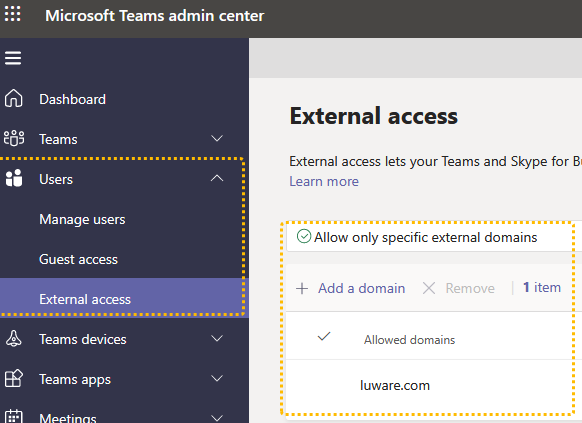
✅ Tenant Admin: You need your tenant to allow external communications with the "luware.com" domain.
Learn more about managing external access
🔍 The necessary configuration steps are described in the Microsoft Teams Documentation: Manage external Access.
✅You will also need to disable the "Enhanced Presence Privacy Mode" policy which prevents visibility of the Teams Presence.
About the "Enhanced Presence Privacy Mode"
The "Enhanced Presence Privacy Mode" is a global configuration which, if enabled, prevents all external organizations from viewing the Teams Presence status of your users via Teams Federation.
If this mode is enabled, Nimbus will see all users as permanently Offline, and thus won't be able to distribute calls to them.
☝ This is a legacy configuration option used in Lync / Skype for Business which is not available anymore in the Microsoft Teams Admin Center. It can only be viewed and configured via PowerShell. As a global setting it applies to all users and cannot be deactivated or bypassed for individual users.
✅ To check whether this is enabled in your tenant by running the following PowerShell command:
Get-CsPrivacyConfiguration | Select EnablePrivacyModeThe command will return "True" if the Enhance Presence Privacy Mode is enabled, or "False" (default value) if it is disabled.
✅ To deactivate it, run the following PowerShell command:
Set-CsPrivacyConfiguration -EnablePrivacyMode $false🤔 Why are these steps necessary? Without being able to read the Teams presence data of your users, Nimbus will consider them as Offline and thus not available for call distribution. They will not be able to receive any inbound calls or place any outbound calls via Nimbus.