| Configurable Property | Task Priority | Behavior |
| Priority | |
|
💡 When to select "Strict" or "Nothing Else" as priority?
Set "Strict" when tasks need to be put on top of your queue.
|
Set "Nothing Else" when tasks should only get distributed when your service queue is empty.
|
| ✅ Use this for emergency services and important VIP hotlines that always should get precedence over anything else in the task queue. | ✅ Use this for non-time-sensitive tasks in when your maximum queue time is long enough for them to get handled eventually. |
| ☝Other tasks can get lost due to potentially long queue times as new incoming “Strict” tasks always take precedence. | ☝ These tasks can get lost due to all other tasks taking precedence. |
🔎 Notes: Priority in other Nimbus areas
-
Nimbus Power Automate Connector: Whenever workflow-related Trigger Event criteria are met, Flow Actions can also be used to set a task priority dynamically.
☝️ This new value will override the default priority set in the Distribution Service Settings. -
Distribution Priority steers “WHEN" a task enters a queue, not the target itself. A service's Distribution Policy steers “WHO”. (e.g. among "Longest Idle" or "Most qualified") Nimbus users gets the task.
💡 In a skill-based service distribution this can mean that even high or strict priority tasks may not get handled, if there is no Agent available to handle this task. -
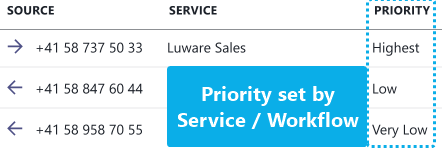
Task widgets (e.g. My Overview or Personal Dashboards) have a "Priority" column which indicates how high this task is ranked in the overall queue.
💡 A priority change may "displace" existing tasks to a new rank.