Enterprise Contact Center This App must be licensed separately per user or service. For more details, head to Nimbus Features.
Luware Interact is a solution that incorporates instant messaging (chat), audio, and video calls directly into a website. Configured by your choice customers interact with your Teams directly – either via service front, or with directly visible single users. From a customer perspective, the Interact UI is very simple to use, directly embedded as a code snippet (widget) on a website.
The customer engages on a simple setup process and starts talking directly to any Nimbus user within their MS Teams client, without any prior plugin or software installation required on Customer side.
By extending your configuration with Interact Domain Templates (CORS), you can define where Interact widgets are allowed to be used and restrict access this way so that no external websites can "redirect" traffic to your services.
🔍First Setup: Refer to Use Case - Setting Up Interact for a step-by-step guide on how to set up Interact for your users and services.
INC Interact Azure Billing
AZURE BILLING
The usage of Interact will cause additional monthly ACS (Azure Communication Services) costs depending on modality (IM/AV) used. These cost are determined by Microsoft. Also see: https://learn.microsoft.com/en-us/azure/communication-services/concepts/pricing
- Before enabling additional modality features for your services, get in touch with your Luware Customer Success specialist to discuss terms, usage scenarios, and necessary setup procedures.
- Please note that Nimbus and Interact support does not cover pricing discussions or make recommendations based on the Microsoft Azure infrastructure.
Overview
Interact can be licensed for users and services. While Interact for users enables customers to get in touch directly with a specific agent by handing over the task directly to the agent, Interact for services handles incoming tasks in a similar fashion as inbound calls are handled. The customer sees the service's name in the Interact widget in the latter case.
Supported Modalities
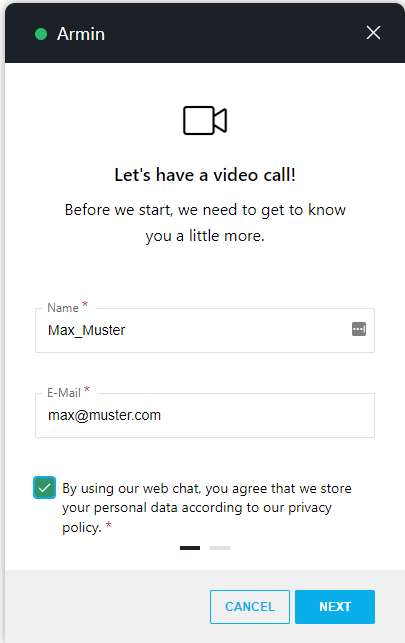
Interact currently supports the following modalities, bi-directional and without any further browser installation requirements:
Audio/Video & Screen sharing
Audio/Video (+ Screen sharing). Customers interact via an Interact widget on your website where they can configure their headset, webcam, and screen sharing options.
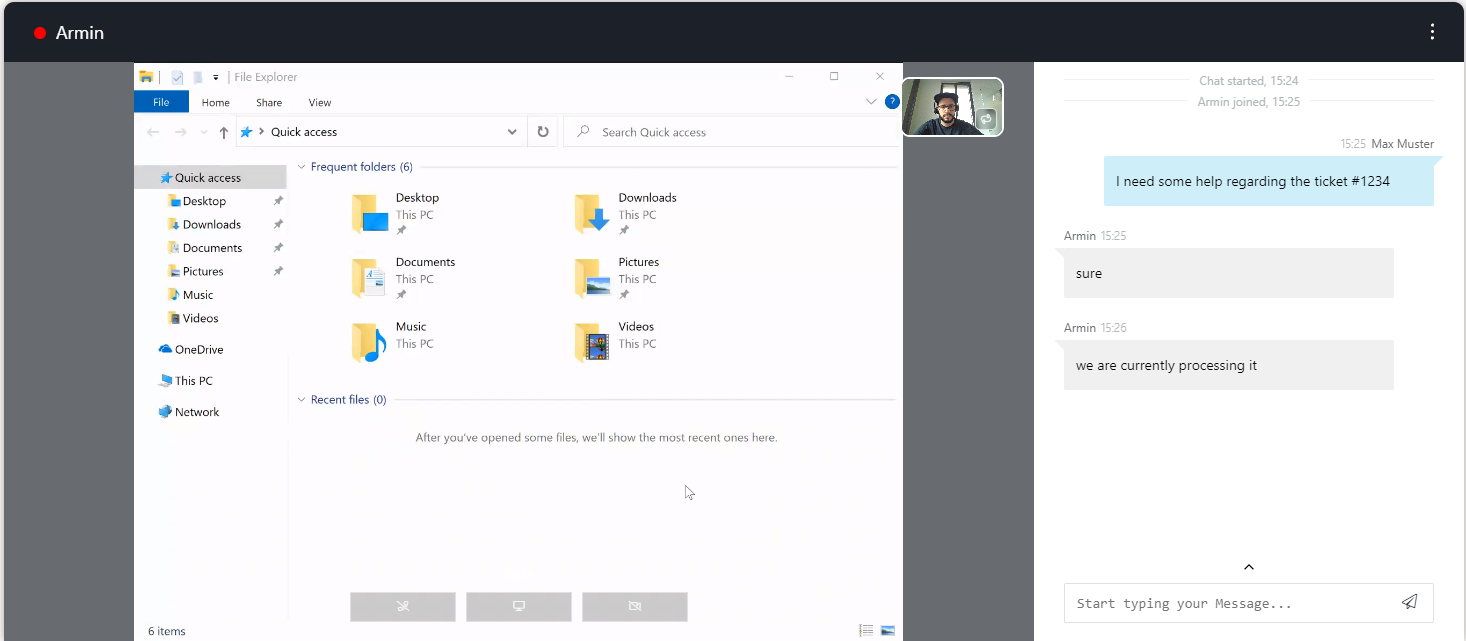
🔍 The Video modality is exclusive to Interact. Refer to Audio/Video for preconditions and requirements. The Use Case - Setting Up Interact is the basic condition for getting A/V calls established.
Instant Messaging
Instant Messaging (Chat) is handled either directly to a user (agent) OR handled according to a service's Instant Message Workflow. In either case, customers interact via an Interact widget on your website where they can provide a name, an email address, and an initial message, and start chatting.
🔍 Refer to Instant Messaging for preconditions and requirements and to Use Case - Setting Up Instant Messaging on a step-by-step guide on how to configure Instant Messaging for the use with Interact.
Before you start: Related Steps
- Nimbus Interact is a separately licensed Nimbus Feature and can be enabled individually for Users and Services. Please get in touch with Customer Success partner as prior setup is required limitations may apply.
- You can enable and configure either modality individually per Interact User Settings and Interact Service Settings, either opting to route incoming modalities via a service queue or directly to the Teams users themselves.
- The Interact configuration is done completely within the Administration. Also refer to Use Case - Setting up Interact for detailed steps.
- Customers from outside will directly interact with Nimbus users and services via website widget. The website whitelist and the embed code are configured via Interact Domain Templates (CORS).
Known Limitations
INC Known Interact Limitations
KNOWN INTERACT LIMITATIONS
- Interact has certain JavaScript calling limitations in regards to operating systems and browsers. Refer to the official MSFT documentation.
- Audio/Video Calls initiated from Interact have the following workflow limitations:
| Workflow Activity | Limitations |
|---|---|
| Transfer |
Can only target services. Not supported targets are:
|
| Queue | "Pickup" distribution type is not supported. |
| Voice Message | Not supported. |
| Customer Input | Sending DTMF over Interact (Client/SDK) is not supported |
INC Instant Messaging Limitations
🔎INSTANT MESSAGING DESIGN NOTES
💡The following notes are “by design”. They describe behavior of message protocols which cannot be circumvented or fully mitigated by Nimbus.
☝Data visibility:
- Visible Customer Inputs: During an ongoing Instant Messaging session, any messages that customer enters into the chat will be visible to the Nimbus user, including information entered during Workflow Activities such as “Collect Information”.
- Attachments sent by either customer or user are subject to the Instant Messaging integration vendor (e.g. WhatsApp, Twilio) and their respective data handling and retention policies. If you are uncertain about handling certain media types via Instant Messages, consider restricting the Allowed File Types within your Data Privacy Service Settings.
☝Delay consideration for Power Automate (e.g. preferred user scenarios):
- Note that – while Instant Messaging tasks can be routed with minimal delay – the measured roundtrip time of e.g. setting a preferred user via Power Automate Flow Action in many cases lies above 1 second.
→ When you want to leverage “Preferred User Routing” in your Distribution Policies we recommend to add a delay in your workflow (e.g. via “Message” or “Delay” Conversation Handling Activity) before handing the task over to your “Queue”.
☝Maximum message length is 1600 characters.1
- Twilio enforces a maximum message length of 1600 characters. Additional Parameters in your (automated) messages count towards this limit.
- In the UI (e.g. My Sessions, Nimbus will detect the integration channel (e.g. SMS, RCS, WhatsApp) and display limits and warning messages accordingly.
- In Workflows, e.g. a “Message” Conversation Handling Activity Nimbus cannot anticipate the incoming integration channel proactively. If the length would be exceeded (e.g. a resolved Parameter leading to a long message), the activity will be skipped.
☝SMS length is impacted by character encoding2. Please keep the length in mind:
- Please note that when you send a long message (via workflow or Nimbus UI), the customer generally receives multiple SMS at the same time. This could be considered as spam - on top of generating additional cost for the involved actors.
- The Nimbus UI will show the amount of SMS generated by a chat response. The amount of remaining characters and SMS will be adjusted when you change the encoding (e.g. by using emoticons).
💡Recommendation: If you intend to handle multiple IM channels via the same workflow and service, keep messages (including resolved Parameters) short in order to not exceed the most restrictive limits.
1Also refer to Twilio' documentation on maximum message length.
2Also refer to Twilio's documentation on SMS character limits and instruct your users accordingly before sending out long message chains.
KNOWN INSTANT MESSAGING LIMITATIONS
💡The following limitations are currently known to the Nimbus development team. We are actively working on improvements.
General limitations
- Supervision is currently not supported for Instant Messaging sessions.
-
Instant Messaging modality support for Workflow Activities is currently limited. Workflows with incompatible activities cannot be selected in the service settings.
-
Unsupported workflow activities: If a workflow is edited in post using unsupported Workflow Activities, the Nimbus Reporting session will terminate with a “failed” reporting outcome.
Show list of supported WF activities
INC Instant Messaging supported WF activities
Currently the following Workflow activities are supported for Instant Messaging workflows:
▼Workflow Activity | Chat Integration path via ►
Interact
WhatsApp
SMS
Conversation Handling
Accept
✅
✅
✅
Announcement
❌
❌
❌
Collect Information
✅
✅
✅
Delay
✅
✅
✅
Disconnect
✅
✅
✅
Disconnect as Handled
❌
❌
❌
Forward
❌
❌
❌
Input Customer
✅
✅
✅
Input Customer (Advanced)
❌
❌
❌
Mark as Handled
❌
❌
❌
Message
✅
✅
✅
Play Music
❌
❌
❌
Reply
❌
❌
❌
Save to Parameter
✅
✅
✅
Standby Duty
❌
❌
❌
Transfer
✅ (to service only)
✅ (to service only)
✅ (to service only)
Virtual User
❌
❌
❌
Voice Message
❌
❌
❌
Web Request
✅
✅
✅
Check
Availability-based Routing
✅
✅
✅
Check Opening Hours
✅
✅
✅
Check Parameter
✅
✅
✅
Get Available Users
✅
✅
✅
Get Queue Position
✅
✅
✅
Wait for Parameter
❌
❌
❌
Queue
Cancel Task
✅
✅
✅
Check Task
✅
✅
✅
Distribution Priority
✅
✅
✅
Queue
❌
❌
❌
Queue Task
✅
✅
✅
💡General Note: If a workflow is edited in post using unsupported activities, the Nimbus Reporting session will terminate with a “failed” outcome.
-
Unsupported workflow activities: If a workflow is edited in post using unsupported Workflow Activities, the Nimbus Reporting session will terminate with a “failed” reporting outcome.
-
Reporting: IM Sessions are currently not differentiated by the Integration method used (either WhatsApp or Interact).
→ A workaround is to use dedicated IM services for either integration method.
Interact specific limitations
- Directly contacting a user via Interact will block a user depending on the incoming modality. The user stays “available” during an Instant Messaging session because a chat is non-blocking, but Audio/Video will result in the user being “not available” because they are in a blocking call.
- Nimbus Reporting Model - There isn't a service nor user session reported when a user is directly contacted.
WhatsApp specific limitations
- Provider Connectors > Twilio - Currently the integration works with “United States” region only.
-
Chat functionality is currently limited to the essential only.
- Message editing & deletion, reactions and replies are not supported and will not be supported (Twilio API limitation)
SMS / RCS specific limitations
SMS/RCS specific limitations
- Provider Connectors > Twilio - Currently the integration works with “United States” region only.