Tasks in Nimbus of any modality in Nimbus usually get distributed via Task Queue and Distribution algorithms. Each task enters the queue with a certain (default “Normal”) priority which can be influenced on several areas of Nimbus.
- As you configure your Distribution Service Settings you can set a default Task priority. 💡 This priority is used for all new incoming tasks.
- The priority can then be influenced via Queue Activities in your Workflow. 💡For example, during special Opening Hours you may want to change the priority to high so customers get service quicker.
- The Nimbus Power Automate Connector can also influence existing or new tasks. 💡This can be useful to identify VIP or Emergency tasks in your queue and give them priority.
Task Priority in a "Queue" workflow activity
Workflows use the Queue Workflow Activity to not only determine Task Priority, but also have “Distribution Type” setting, which determines how (many) users get a task invitation request. Especially in a multi-service environment, the "Priority" setting affects this "Distribution Type".
We'll explain this with an example below:
Scenario |
Setup |
Outcome |
|---|---|---|
2 Services A&B using a "Broadcast" Queue Activity Distribution Type setting in their Workflows. 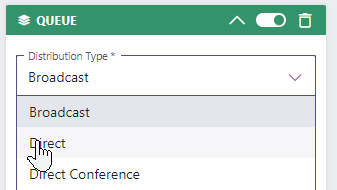 |
Service A :
|
|
💡Learnings:
| ||
Distribution Priority Settings
When configuring your Queue Workflow Activity you have access to the following options:
INC Distribution Priority
| Configurable Property | Task Priority | Behavior |
| Priority | |
|
💡 When to select "Strict" or "Nothing Else" as priority?
Set "Strict" when tasks need to be put on top of your queue.
|
Set "Nothing Else" when tasks should only get distributed when your service queue is empty.
|
| ✅ Use this for emergency services and important VIP hotlines that always should get precedence over anything else in the task queue. | ✅ Use this for non-time-sensitive tasks in when your maximum queue time is long enough for them to get handled eventually. |
| ☝Other tasks can get lost due to potentially long queue times as new incoming “Strict” tasks always take precedence. | ☝ These tasks can get lost due to all other tasks taking precedence. |
🔎 Notes: Priority in other Nimbus areas
-
Nimbus Power Automate Connector: Whenever workflow-related Trigger Event criteria are met, Flow Actions can also be used to set a task priority dynamically.
☝️ This new value will override the default priority set in the Distribution Service Settings. -
Distribution Priority steers “WHEN" a task enters a queue, not the target itself. A service's Distribution Policy steers “WHO”. (e.g. among "Longest Idle" or "Most qualified") Nimbus users gets the task.
💡 In a skill-based service distribution this can mean that even high or strict priority tasks may not get handled, if there is no Agent available to handle this task. -
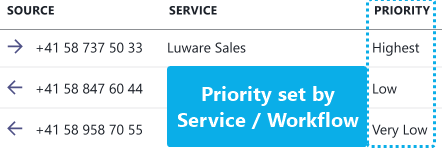
Task widgets (e.g. My Overview or Personal Dashboards) have a "Priority" column which indicates how high this task is ranked in the overall queue.
💡 A priority change may "displace" existing tasks to a new rank.
Round Robin Task Distribution
As tasks with low or high priority could always outweigh and thus “starve” existing tasks out of a queue, a weighted round robin method is in place to mix tasks of different priority, which are equally distributed amongst available users.
INC Weighted Round Robin Method
Learn more about the weighted round-robin method
The Round Robin procedure distributes the calls in such a way that the ratio between the individual priority levels is always 2:1. Each time another "Round" is started, that round counter is applied to the "weight" of the remaining tasks.
The following example table assumes a configuration with 3 priority levels. There are 21 calls in the queue, with the following priority:
- 12 calls with priority 1
- 6 calls with priority 2
- 3 calls with priority 3
Following the 2:1 rule, the calls are queue over time t as follows:
- Round 1: High Med tasks added in 2:1 ratio. No "Low" priority tasks in Round 1 as "Medium" task count outweighs the low task count.
- Round 2: High Med Low tasks added in 2:1 ratio. The "Low" priority tasks get a round-multiplier added to their weight, now outweighing "Medium" tasks and thus are added in a 2:1 ratio.
- Round 3: Same as Round 1.
🔍 Sources: Weighted Round Robin (Wikipedia Article). Please note that this example only works as long as no new calls are being processed. Calls with strict or no priority are not considered in this rule.
Legend: Q: Calls in Queue | H: Handled | R: Remaining
| Priority | Q | H | R | H | R | H | R | H | R | H | R | H | R | H | R | H | R | H | R | H | R | H | R | H | R | H | R | H | R | H | R |
|---|---|---|---|---|---|---|---|---|---|---|---|---|---|---|---|---|---|---|---|---|---|---|---|---|---|---|---|---|---|---|---|
| 1 (high) | 12 | 2 | 10 | 2 | 8 | 2 | 6 | 2 | 4 | 2 | 2 | 2 | 0 | ||||||||||||||||||
| 2 (med) | 6 | 1 | 5 | 1 | 4 | 1 | 3 | 1 | 2 | 1 | 1 | 1 | 0 | ||||||||||||||||||
| 3 (low) | 3 | 1 | 2 | 1 | 1 | 1 | 0 | ||||||||||||||||||||||||
| Round Counter | Round 1 | Round 2 | Round 3 | Round 4 | Round 5 | Round 6 | |||||||||||||||||||||||||
| Time (t) | t1 | tn | |||||||||||||||||||||||||||||
☝ Reminder: Tasks in a queue with either "Strict" or "Nothing Else" priority will ignore round-robin distribution.