Nimbus Admins can expand the selection of base System & Call Parameters with their own Custom Parameters. This allows setting parameter default field values for later checks - e.g. to verify if Nimbus (or external Systems) have actually performed any updates on the Parameter.
| Name | |
|---|---|
| Parameter |
Parameters are placeholders containing one or multiple → Fields each with a name and → Value. They are used to store data and control system behavior. Complex Parameters can have names consisting of multiple parts, e.g. Further distinguished in name by:
|
| Field | Individual piece of information, identified by its field name. One or multiple fields collectively define the values of a parameter. |
| Value | The actual content of a field, either used to be shown within the Nimbus UI as Context or for storage purposes, e.g. as an Input. |
💡Parameters and their individual fields can be referenced via their names throughout Nimbus (e.g. Workflows), but also referenced in external Systems when using the Nimbus Power Automate Connector. Below are some examples for their usage.
Parameter examples
From an system point of view, the parameters are storage placeholders for different purposes. In Nimbus there are two types of parameters to know:
| Parameter Type | Parameter name (Placeholder) | Example field names and values |
Name set | Field Value Set |
Purpose |
|---|---|---|---|---|---|
| System parameter | $(MicrosoftCallerId) |
Callername: Anonymous CallerNumber: |
hardcoded | by System | Caller Identification for the system to process. |
| $(Customer.DisplayName) | Customer Display Name: Jon Doe | hardcoded | by System | After system processing, showing caller Identification to Nimbus users, e.g. My Sessions UI. | |
| Custom parameter | $(Customer.CustomFields.<AnyName>) | Occupation: Taxi Driver | user defined | by User | Context, e.g. a retrieved Customer CRM ID used in Extensions Service Settings as part of an URL shown as extra field. |
| $(CustomContextParameters.<AnyName>) |
IVR Choice: “0_Unspecified” IVR Choice: “2_Support” |
user defined | by User | Store caller inputs, e.g. type of problem, IVR choice taken and stored in a Workflow Activity. |
💡Learning: Parameters can store anything and may be overwritten (if not hardcoded and read-only). They may be used to steer system behavior or contain custom context information.
Field examples
From a user point of view, the fields of a parameter can appear identical, e.g. an “Customer Address” field, but those fields can originate from different sources (CRM, Address book) via Flow Actions.
| Field Type | Field name | Name set | Field value set | Value read by user… |
|---|---|---|---|---|
|
Call attributes (see System Parameters > Call Data > Caller Data Fields) |
callId | hardcoded | by System | as Parameter with hardcoded value |
| customerId | hardcoded | by System | as Parameter with hardcoded value | |
| customerAddress | hardcoded | by user via Parameters | as Parameter with user-controlled value | |
| customer.customFields | user defined | by user using Parameters | as Parameter with user-controlled value | |
|
(see System Parameters > Address Book Fields) |
addressBookId | hardcoded | by System | as hardcoded value |
| customerId | hardcoded | by user in a free form using “Address Book” handling Flow Actions. | as user-controlled value | |
| customerAddress | hardcoded | as user-controlled value | ||
| customFields | user defined | as user-controlled value |
💡Learning: Fields can have identical names, but come from different parameters. A field refresh is done via Flow Actions at certain Trigger Events in your Workflows.
Usage in Power Automate
Using the Flow Actions in the Nimbus Power Automate Connector parameter fields and their values can be updated. This can be any static or dynamic value, e.g. retrieved from external systems.
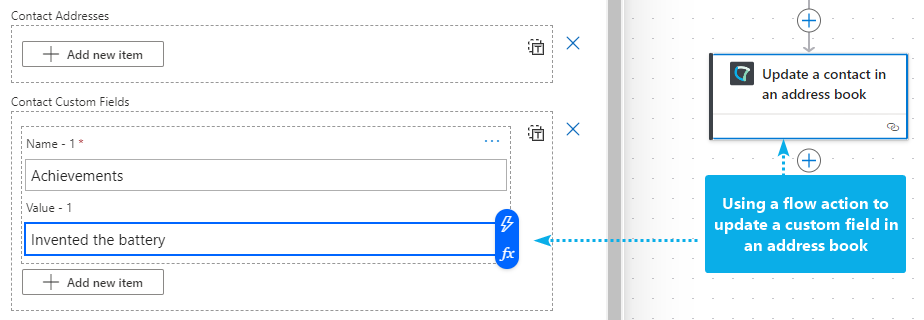
As previously mentioned, a mixture of system and custom fields are part of the JSON object as in a key/value pair. The customFields in this example are forming the bottom part of an Address Book which was previously created in the Nimbus configuration.
[
  {
    "addressBookId": "97ff7cf8-ee53-4de9-aca3-1287d2fea51e",
    "id": "eb30d621-a7cc-4fb3-b0f1-a046ed04e1df",
    "externalId": "03fac1cb-f00b-4521-b8c1-4c168752a7f5",
    "firstName": "Alessandro",
    "lastName": "Volta",
    "displayName": "Alessandro Giuseppe Antonio Anastasio Volta",
    "company": "Tenant Address Book",
    "jobTitle": "Scientist",
    "imAddresses": [],
    "emailAddresses": [],
    "businessPhones": [],
    "mobilePhones": [
      "123456789-10"
    ],
    "homePhones": [],
    "userPrincipalName": "avolta@lunifico.cloud",
    "addresses": [],
    "customFields": [
      {
        "name": "Achievements",
        "value": "Invented the battery"
      },
      {
        "name": "Birth Year",
        "value": "1745"
      },
      {
        "name": "Language",
        "value": "Italian"
      }
    ]
  }
]
🔎 Address Books are just an example for storage for your parameter data. Here are some Power Automate Use Cases for your inspiration:
- Use Case - Storing External CRM Data in Custom Parameters
- Use Case - Adding External Address Books via Power Automate
- Use Case - Retrieving Microsoft Entra ID Fields via Agent Token
- Use Case - Looking Up a Caller to Open Dynamics 365 Contact Context
- Use Case - Creating a ServiceNow ticket based on user input
- Use Case - Looking up caller data from a simple Excel list
- Use Case - Working with Blacklists or Whitelists in Nimbus.